One agent.
Every chat app.
The coding agent you already use, like Claude Code or Codex, in WeChat, Feishu, Slack, Telegram and the rest of your chats. One name, one memory, several things at once. On your own computer.
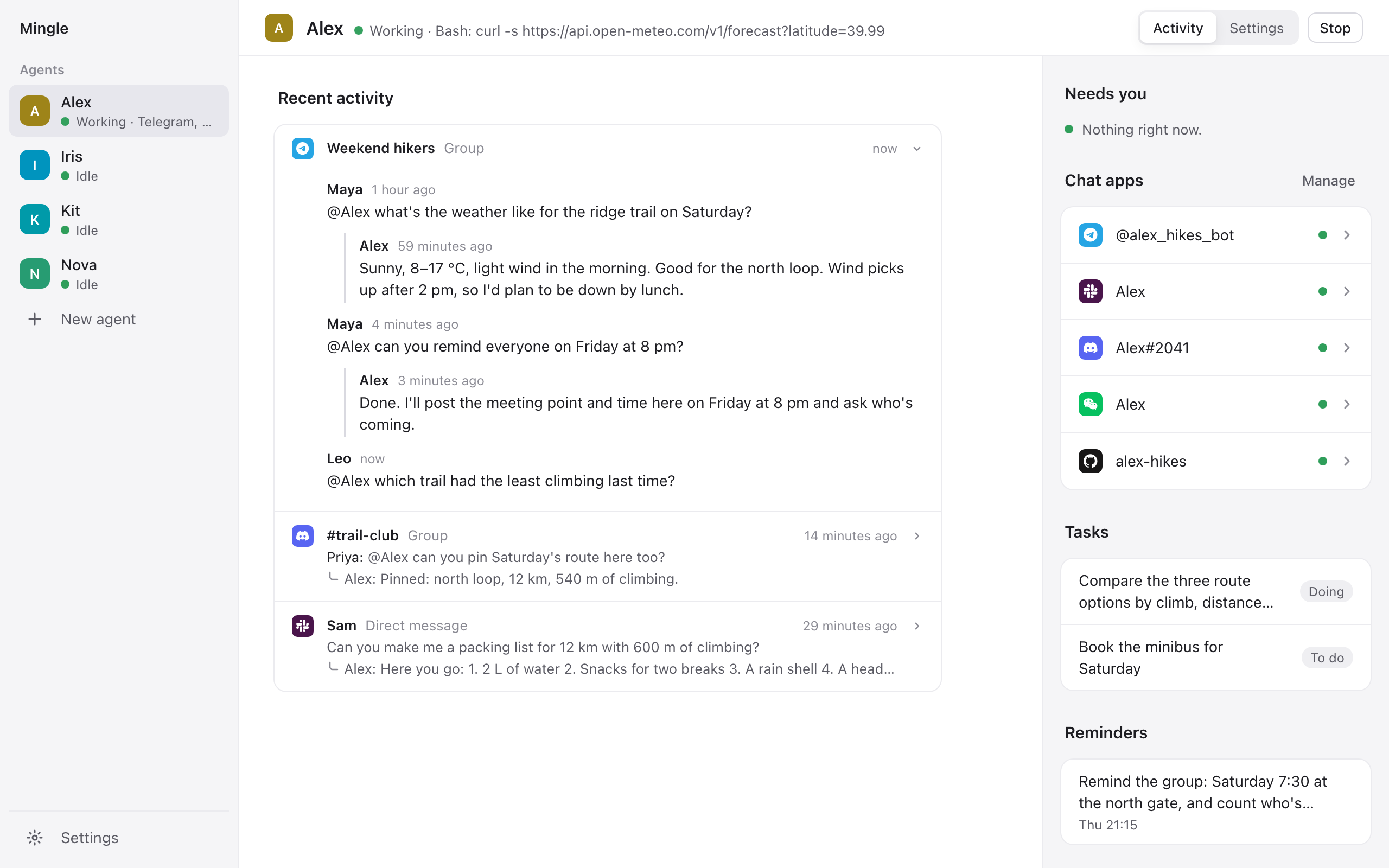











One agent
Like a person, not a bot per app.
Alex isn't a separate bot in each app. It's one someone, with the same name, face and memory in every chat app it joins. Tell it something in one app and it knows it in the next. There is no /new and no /switch; the one command is /stop.
Remembers across apps
One agent, one memory, in every chat app it joins.
Keeps up in a group
No need to @ it every time. Once someone is talking with it, it picks up when they finish, often with a quick line before the longer answer. Chatter that isn't for it, it just hears, without spending much.
Knows who's who
An address book of everyone it talks to. Link one person's accounts and it knows Leo on Telegram is Leo on Slack.
Tasks and reminders
It writes down what it's working on and speaks up on time. It can keep an eye on CI, a web page or a new release, and only spends a turn when something changes.
Shows its work
A reaction on your message, then a live reply that becomes the answer.
Files both ways
Send it a file or a photo; it sends files back, on every app.
Several things at once
Works on the side.
Answers right away.
Ask for something that takes a while, like fixing a bug or comparing three vendors, and Alex works on it on the side while it keeps answering everyone else. When it's done, it replies under your message.
- Quick answers stay quick A question gets its answer in seconds, even while code is being written.
- Back where you asked The result arrives under the message that asked for it, from Alex.
- Follow-ups find the work Reply to it, and the same piece of work picks up where it left off.
- Nothing to set up No helpers to create and no settings. Up to three things run at once.
How it works
Three steps. About a minute.
-
1
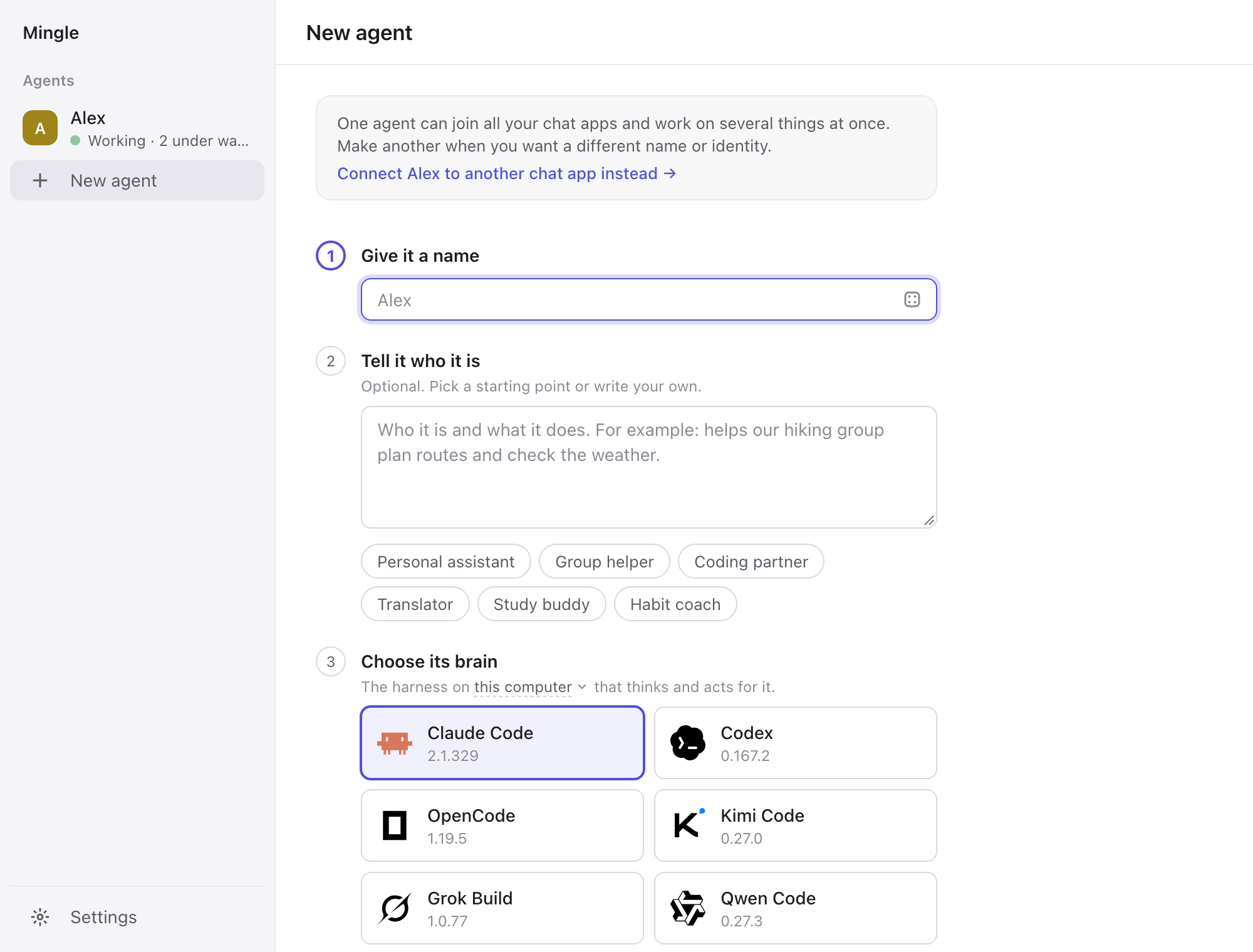
Create an agent
Give it a name and say who it is in plain words. Then pick its brain: Mingle lists the harnesses on this computer and their models, and can install and sign in to one that's missing.
-
2
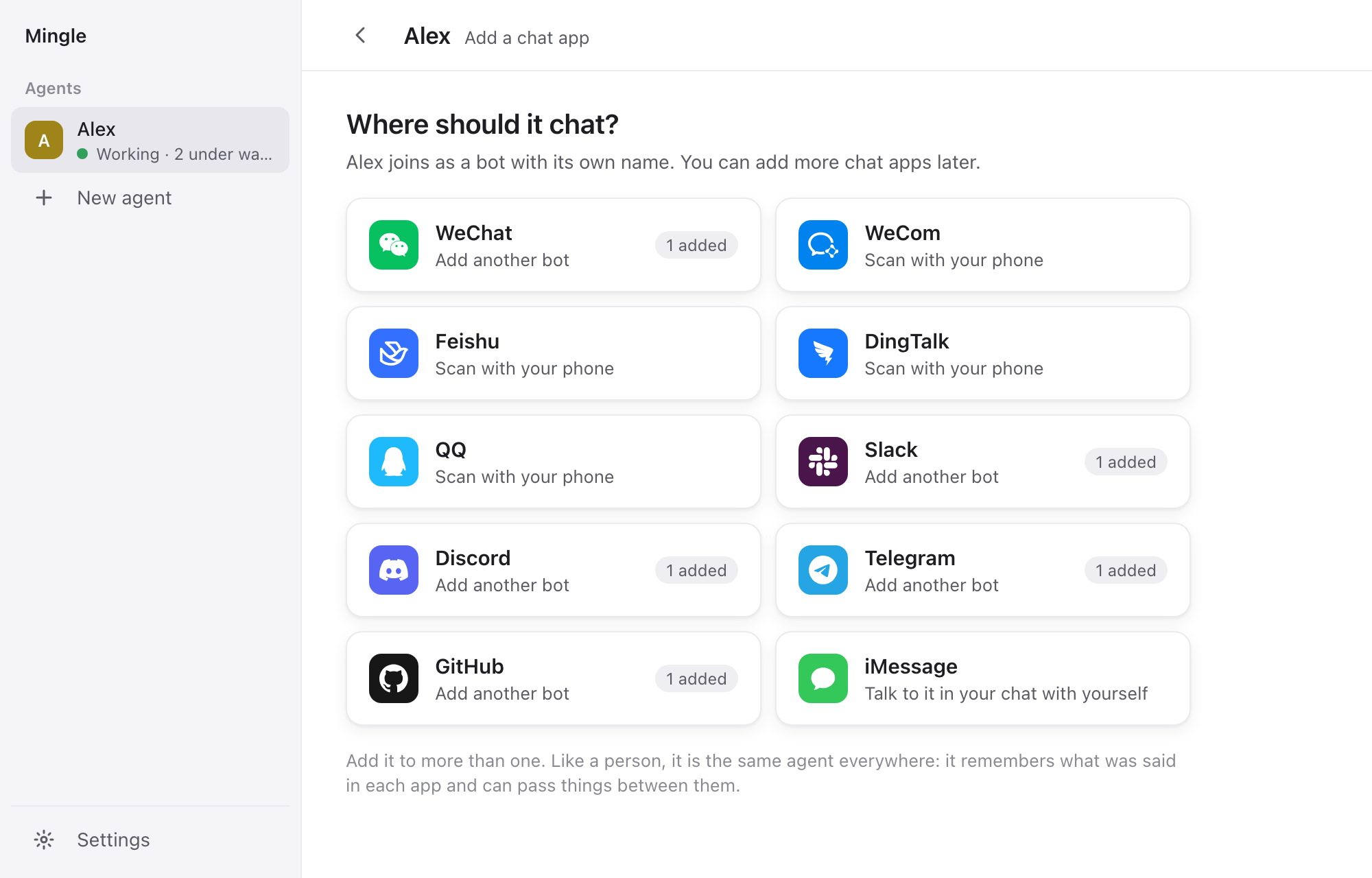
Connect a chat app
Scan a code with your phone for WeChat, WeCom, Feishu, DingTalk and QQ. Paste a token for Slack, Discord and Telegram. Sign in the agent's own GitHub account with a code. On a Mac, iMessage uses your chat with yourself. The console checks each step as you go.
-
3
Talk to it
Message it directly, or @ it in a group, or just call it by name. It reacts as soon as it starts, and the reply fills in while it works. You're its owner: the one who scanned the code, or who sends it the 6-digit code the console shows.
Brains
Bring the brain you already pay for.
Mingle drives the coding agent you have already installed and signed in to. Pick any of them per agent, and switch any time.
Tested end to end with Claude Code, Codex, OpenCode and Kimi Code.
- Your subscription or key Mingle never calls a model itself. The harness you signed in to does.
- A model per agent Change it any time. The next message uses it.
- Quota at a glance Settings shows how much of each harness's quota is left.
- Installed for you A missing harness installs, signs in and updates from the app.
No server
There is no Mingle server.
So nothing of yours is on one.
Mingle isn't a service you sign up for. It's a program on your computer that links your chat apps to your own agent directly. No account, no cloud relay, no telemetry: no database of your chats for anyone to break into, and no one at Mingle who could read them.
Your agent

 Claude Code

 Codex

 Cursor

 OpenCode

 Kimi Code
your own subscription
 Mingle
127.0.0.1 · on your computer
- Memory and filesyour disk
- Bot tokenssystem keychain
- Account, telemetrynone
Your chat apps
- Feishu
- Slack
- Telegram
- Discord
official bot APIs
Local only
The console listens on 127.0.0.1 and nowhere else. The agent's memory and files stay in its own folder on your disk.
Strangers ask first
On apps anyone can find, like Telegram, Discord and QQ, a new person or group waits for your OK before the agent works for them.
Credentials in the system's store
Bot tokens live in the macOS Keychain, Windows DPAPI or the Linux Secret Service. Never in the database, the logs or an API response.
Official bot channels first
Chat apps connect through their official bot APIs. iMessage has none, so it runs on your own Apple ID on your Mac, never through a cloud bridge.
Your messages still pass through the chat app and your model provider. That part is theirs, not ours. Security → · Compare →
Handoff
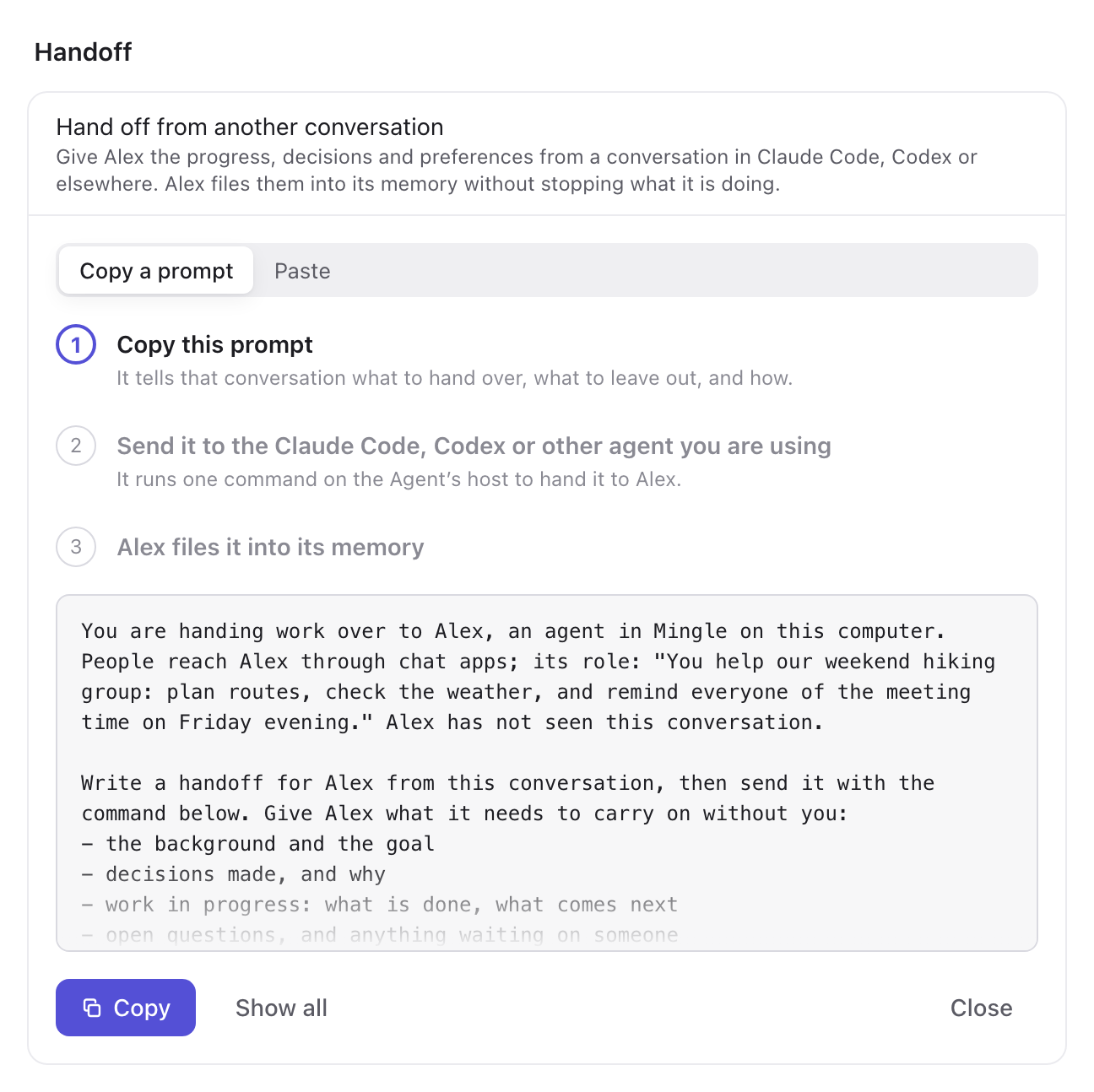
Catch it up from any conversation.
Been working on something in Claude Code or Codex? Copy one prompt into that conversation and it writes Alex a handoff: the progress, the decisions, your preferences. Alex files it into its memory and tasks without stopping what it's doing.
Terminal
Also a CLI. Agents use it too.
One command installs the desktop app. From source, the same mingle command runs everything from a terminal, and it's how agents talk back: reply, send, read and search the chat, keep an address book, tasks and reminders.
curl -fsSL https://github.com/earayu/Mingle/releases/latest/download/install.sh | shirm https://github.com/earayu/Mingle/releases/latest/download/install.ps1 | iexgit clone https://github.com/earayu/Mingle.git && cd Mingle
pnpm install && pnpm build
node dist/cli/main.js start$ mingle start
# run Mingle and open the console
$ mingle harnesses
# harnesses installed on this computer
$ mingle agent create --name Alex --harness claude --role "You help me plan trips."
$ echo "$TELEGRAM_BOT_TOKEN" | mingle connect alex telegram
$ mingle status
# agents and their connections
$ mingle log
# Mingle's log, even when it's not runningQuestions
Common questions.
- Does my data go to a Mingle server?
- No. There is no Mingle server, no account and no telemetry. Mingle runs locally on your computer and connects straight to each chat app and your local harness. Messages still pass through the chat app and your model provider.
- Do I need a separate API key?
- No, if your coding agent is already signed in with a subscription, such as Claude Code or Codex. An API key configured in your harness also works. Mingle never calls a model itself or adds a fee.
- Which coding agents and chat apps are supported?
- Mingle supports 14 coding-agent harnesses through OAR (tested end to end with Claude Code, Codex, OpenCode and Kimi Code) and connects to WeChat, WeCom, Feishu, DingTalk, QQ, Slack, Discord, Telegram, GitHub and iMessage on Mac.
- Does one agent really share memory across chat apps?
- Yes. Each agent has one long-lived session and one local home folder (ROLE.md, MEMORY.md and notes/) shared across every chat app it joins. You can ask it in one app about a decision made in another.
One agent. Every chat app.
Free and open source, on your own computer. For macOS, Windows and Linux.
See this release's notes for signing details and installation instructions. Release notes →