

Mingle + Claude Code
Claude Code in every chat app.
On your own computer.
Keep Claude Code running on your own machine and talk to it from Slack, Telegram, Discord, WeChat, Feishu, GitHub or iMessage. Reuses your existing subscription or API key with zero cloud server.
Quick start
Up and running in a minute.
- 1
Install Mingle on macOS, Windows or Linux
Download the menu-bar / tray desktop app or run the one-line terminal installer. Mingle detects your local Claude Code installation and quota automatically—or installs and signs in to it from the console.
- 2
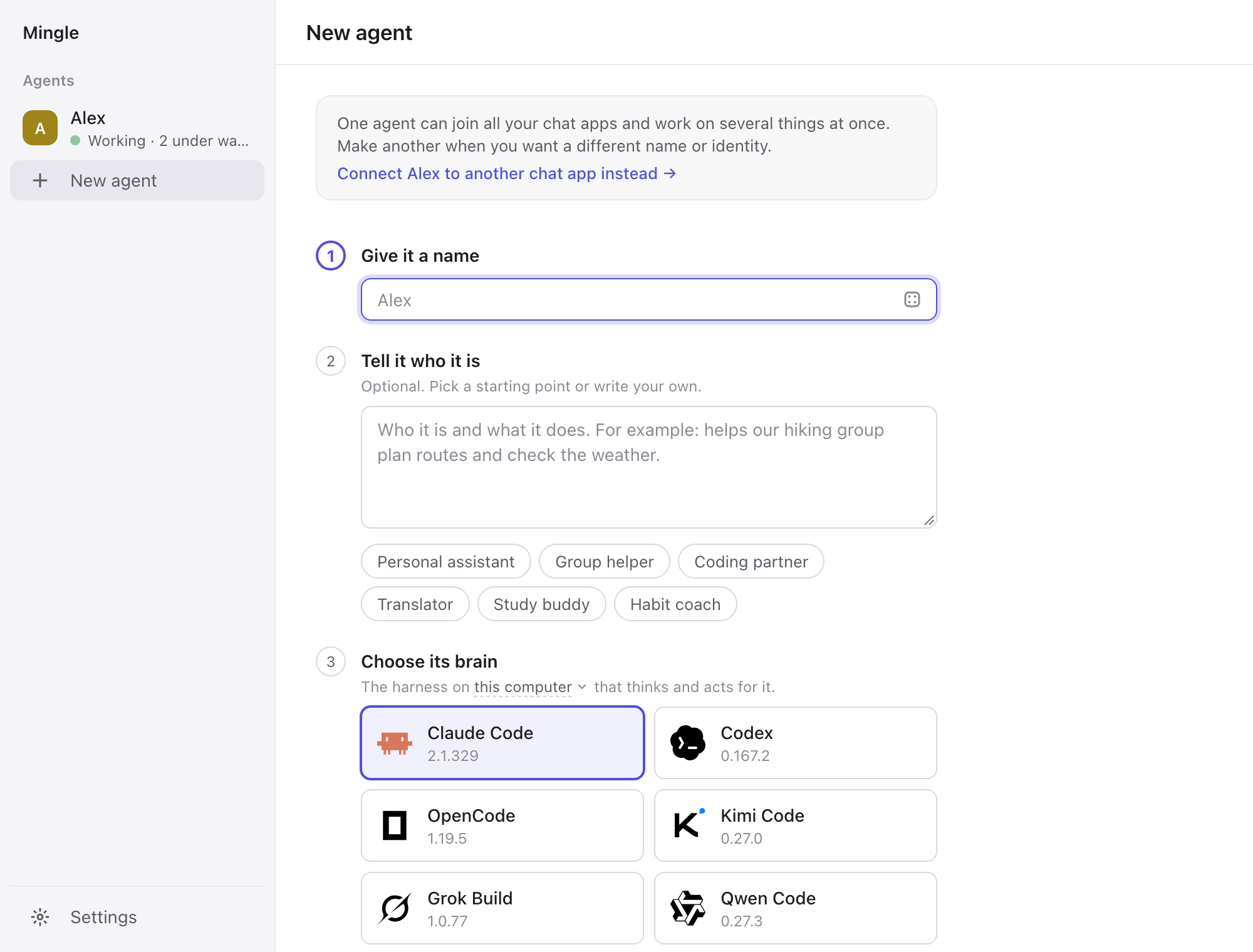
Create an agent driven by Claude Code
Give the agent a name and a plain-text role (ROLE.md), then pick Claude Code and your preferred model. Each agent keeps its own home folder, MEMORY.md and notes/ on your disk.
- 3
Connect your chat apps and message from anywhere
Scan a QR code for WeChat, Feishu, WeCom, DingTalk or QQ, paste a bot token for Slack, Discord or Telegram, link GitHub, or enable iMessage on macOS. Message your local Claude Code right from your phone.
mingle agent create --name Alex --harness claude --role "You help with my repos and daily tasks."Why Mingle
Everything Claude Code can do, reachable from your phone and team chats.
Your existing Claude subscription or API key
Mingle never calls an LLM API itself and adds no token markup. It drives the Claude Code harness you already signed in to on your computer and shows remaining quota in Settings.
One persistent session across 10 platforms
Unlike isolated chatbots, one Mingle agent keeps one long-lived Claude Code session and one memory across Slack, WeChat, Feishu, Discord, Telegram, GitHub and iMessage.
Parallel background work without blocking
Hand Claude Code a bug fix or repo refactor in a group chat: it runs on the side (up to 3 concurrent jobs) in a native thread while still answering quick questions in seconds.
Full local access with owner guardrails
Because Claude Code stays on your computer, it can read your local files and tools directly—while credentials stay in your OS keychain and public apps require owner approval.
Chat apps
Use it in every chat app you already have.
Connect one or more platforms to the same local agent—one long-lived session and one shared memory across all of them.
Questions
Common questions.
- Do I need an Anthropic API key to use Claude Code with Mingle?
- No. If Claude Code is already signed in with your Claude subscription, Mingle drives it directly. An API key configured for Claude Code works too.
- Can I control my local Claude Code from my phone when I am away from my desk?
- Yes. Leave Mingle running on your Mac, Windows PC or Linux machine and message your agent from Telegram, Slack, Discord, WeChat, Feishu or iMessage on your phone.
- How is this different from the Claude mobile app?
- The Claude mobile app cannot run inside your team's Slack/Feishu/Discord groups, touch files on your computer, monitor local shell checks, or share one persistent workspace across chat apps. Mingle bridges your local Claude Code directly into your existing chats.
- Does Mingle send my Claude Code transcripts to a Mingle server?
- No. There is no Mingle server, no account and no telemetry. Messages go only between your chat app, Mingle on your computer (127.0.0.1), and your local Claude Code harness.
Other verified harnesses
Switch brains anytime.
Mingle supports 14 coding agent harnesses through OAR and lets each agent choose or change its harness and model anytime.



One agent. Every chat app.
Free and open source, on your own computer. For macOS, Windows and Linux.
See this release's notes for signing details and installation instructions. Release notes →